Roblox classroom trivia experience with HttpService#
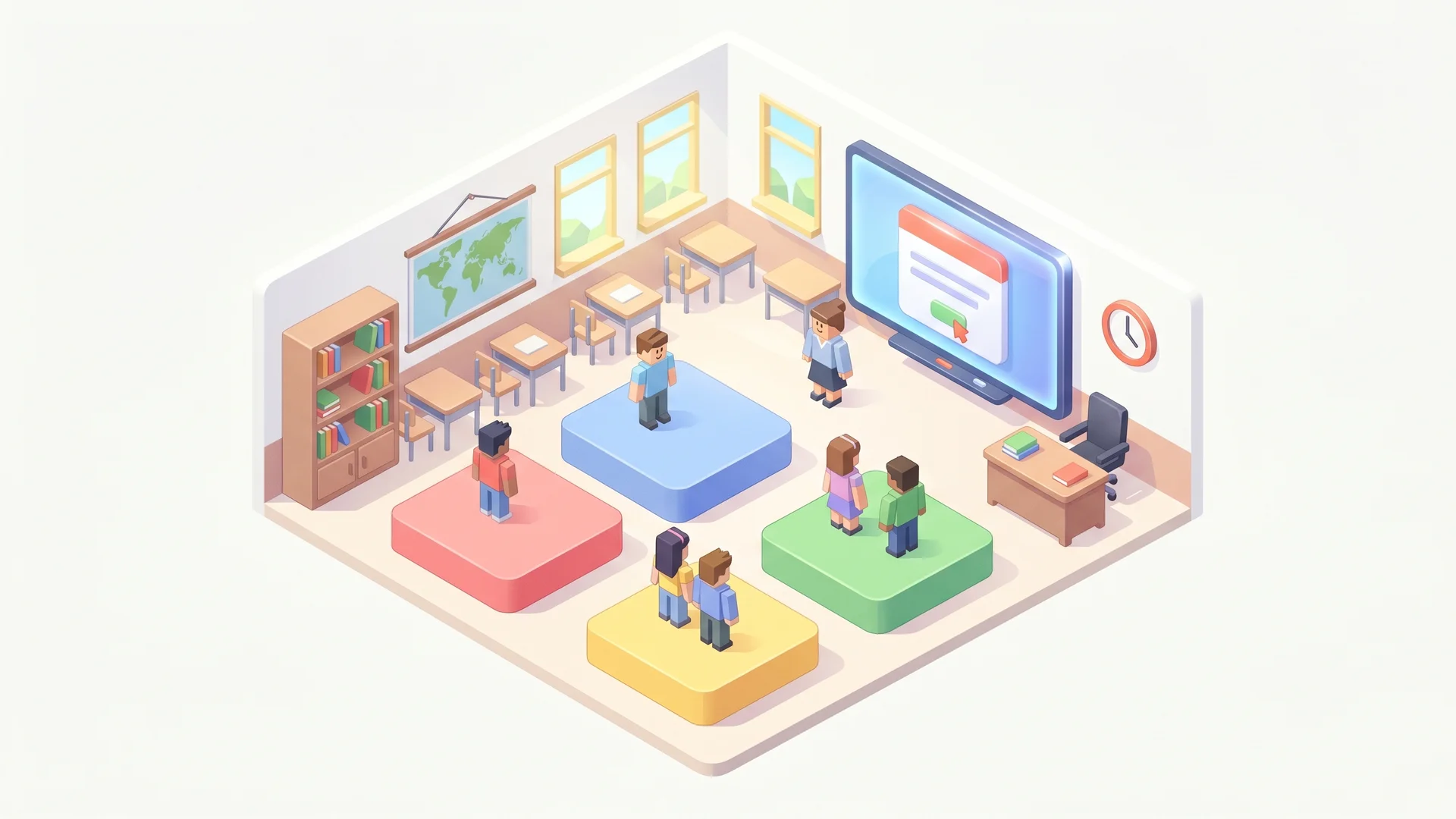
Roblox is the platform where 100+ million daily players already are — most of them between 8 and 16, exactly the demographic where teachers struggle to land “engaging classroom content”. This guide builds a Roblox Studio experience that runs as a virtual classroom: a teacher avatar (or moderator-only seat) picks a topic, players stand on numbered platforms (A/B/C/D), question appears on a 3D screen, fastest-correct-team scores.
Roblox HttpService makes real HTTP requests from a server Script. We use it to call QuizBase REST and stream questions into the experience without ever leaving Roblox Studio. The lesson plan is the QuizBase content; the engagement is the Roblox loop.
What you’ll build#
A Roblox experience set in a small classroom with:
- Four answer platforms (A/B/C/D) where students stand to vote
- 3D screen at the front displaying the current question text + four shuffled answer choices
- Teacher seat (only the experience owner can sit there) — clicks “Next question” to advance
- Server-side scoring — the platform a player stood on at reveal-time = their answer; correct platform’s standers each get +1
- Topic picker — teacher rotates between QuizBase categories (
animals,science,geography,history) via in-game buttons - Per-experience question dedup — server tracks question IDs in
seenIds: Setso a 45-minute class never sees the same question twice
The mechanic — server-side stable ID dedup#
Roblox server Scripts have a persistent memory for the lifetime of the experience instance. Track seenIds: Set in the server’s Lua state, query /api/v1/questions/random, refetch on collision. Same pattern as the Slack/Discord trivia bot and MCP Slack trivia bot — see /docs/api/questions-by-id for the canonical reference.
Stack#
- Roblox Studio (free download, Mac + Windows)
HttpService— built-in, allows outbound HTTP to allow-listed domainsStarterGui+SurfaceGui— text on 3D screenPlayers+Workspace— touching the answer platforms- QuizBase publishable key —
qb_pk_*free tier. Stored in Roblox’s secrets store (the encrypted per-game vault) so the key never appears in your.rbxlfile or your published experience.
Step 1 — Set up Roblox Studio + enable HTTP#
In Roblox Studio: File → New → Baseplate. Then File → Experience Settings → Security:
- Enable ”Allow HTTP Requests” (off by default for new experiences)
- Add
https://quizbase.runriva.comto the HTTP Request Allow List (paste the exact base URL)
Then create the secret. For a published experience, do it from the Creator Dashboard → your game → Secrets → Create Secret (name QUIZBASE_KEY, value your qb_pk_* key, domain quizbase.runriva.com). For Studio testing, also add a local secret under the same File → Experience Settings → Security → Secrets panel — the production secrets store is only readable from live servers and collaborative testing, never from local playtesting.
The secret is never serialised into the saved .rbxl and never exposed to client LocalScripts — only server Scripts can read it via HttpService:GetSecret(), and even then it comes back as an opaque Secret value you can’t print or concatenate.
Step 2 — Wire QuizBase fetch from a server Script#
In ServerScriptService, add a new Script (not LocalScript):
-- ServerScriptService/QuizBaseFetch.lua
local HttpService = game:GetService('HttpService')

local seenIds = {}

local function fetchUnique(category, retries)
	retries = retries or 3
	local secret = HttpService:GetSecret('QUIZBASE_KEY')
	local url = 'https://quizbase.runriva.com/api/v1/questions/random'
	if category then url = url .. '?category=' .. category end

	for attempt = 1, retries do
		local response = HttpService:RequestAsync({
			Url = url,
			Method = 'GET',
			-- Pass the `Secret` value straight into Headers. You can't (and
			-- shouldn't try to) turn it into a string — `RequestAsync` accepts a
			-- `Secret` directly in Headers and the URL, and substitutes the real
			-- value at request time. The bare key goes in `X-API-Key`; if you
			-- needed a Bearer token you'd write `secret:AddPrefix('Bearer ')`.
			Headers = {
				['X-API-Key'] = secret,
				['Accept'] = 'application/json'
			}
		})

		if response.Success then
			local body = HttpService:JSONDecode(response.Body)
			if not seenIds[body.id] then
				seenIds[body.id] = true
				return body
			end
		end
	end
	error('No fresh question after ' .. retries .. ' retries')
end

return { fetchUnique = fetchUnique }
The seenIds table is server-process-local. When the experience server restarts (Roblox cycles servers on low player count or after long uptime), the table empties and we start fresh — acceptable for a classroom session that runs for one period.
Step 3 — Render question on the 3D screen#
In Workspace, add a Part shaped like a screen (BlockMesh, 16:9). Inside the part add a SurfaceGui with a TextLabel for the question and four TextLabels for choices. The server Script updates the GUI via :WaitForChild():
-- ServerScriptService/Round.lua
local quiz = require(game.ServerScriptService.QuizBaseFetch)
local screen = workspace:WaitForChild('ScreenPart')
local gui = screen:WaitForChild('SurfaceGui')

local function shuffle(t)
	for i = #t, 2, -1 do
		local j = math.random(i)
		t[i], t[j] = t[j], t[i]
	end
end

local currentRound

local function nextQuestion(category)
	local q = quiz.fetchUnique(category)
	local choices = { q.correctAnswer, table.unpack(q.incorrectAnswers) }
	shuffle(choices)
	local correctIndex
	for i, c in ipairs(choices) do
		if c == q.correctAnswer then correctIndex = i end
	end

	gui.QuestionLabel.Text = q.text
	for i = 1, 4 do
		gui['Choice' .. i].Text = string.char(64 + i) .. '. ' .. choices[i]
	end
	gui.AttributionLabel.Text = 'Source: ' .. q.attribution.author .. ' (' .. q.attribution.license .. ')'

	currentRound = { id = q.id, correctIndex = correctIndex }
end
The AttributionLabel is required — QuizBase content ships under CC BY-SA / CC BY / MIT, and surfacing attribution to the audience is a license requirement. See /data for the full attribution rules. If you skip this you’re out of compliance.
Step 4 — Score the platforms (server-side)#
Add four Parts in Workspace named PlatformA, PlatformB, PlatformC, PlatformD. When a teacher clicks “Reveal”, the server checks which players are touching the correct platform and increments their score:
local Players = game:GetService('Players')
local scores = {}

local function reveal()
	if not currentRound then return end
	local correctPlatform = workspace:WaitForChild('Platform' .. string.char(64 + currentRound.correctIndex))
	for _, player in ipairs(Players:GetPlayers()) do
		local character = player.Character
		if character and character.PrimaryPart then
			local pos = character.PrimaryPart.Position
			local cp = correctPlatform.Position
			local platSize = correctPlatform.Size
			if math.abs(pos.X - cp.X) < platSize.X / 2 and math.abs(pos.Z - cp.Z) < platSize.Z / 2 then
				scores[player.UserId] = (scores[player.UserId] or 0) + 1
			end
		end
	end
	-- Flash the correct platform green for 2 seconds
	correctPlatform.Color = Color3.fromRGB(0, 255, 0)
	wait(2)
	correctPlatform.Color = Color3.fromRGB(200, 200, 200)
end
Step 5 — Teacher controls + category picker#
Add two ClickDetector-equipped parts: “Next question” and “Reveal”. The ClickDetector server event verifies the player is the experience owner (or has a designated TeacherRole attribute):
local owner = game.CreatorId

workspace.NextButton.ClickDetector.MouseClick:Connect(function(player)
	if player.UserId == owner then
		nextQuestion(currentCategory or 'science-and-nature')
	end
end)

workspace.RevealButton.ClickDetector.MouseClick:Connect(function(player)
	if player.UserId == owner then
		reveal()
	end
end)
For category rotation, place four “category” parts (Animals/Science/Geography/History) the teacher steps on between rounds; a Touched event sets currentCategory. Slug values come from /api/v1/categories.
Pitfalls#
HttpService:GetSecretreturns aSecretvalue, not a string — you can’t print it or concatenate it. Pass it directly into theHeaderstable (or theUrl) ofRequestAsync; the engine substitutes the real value at send time. Usesecret:AddPrefix("Bearer ")only when an API needs aBearerprefix. Secrets can go in the URL or headers but never the request body. See HttpService:GetSecret and the secrets store guide.- Secrets are unavailable in local playtesting —
GetSecretthrowsCan't find secret with given keyunless you add a matching local secret under Experience Settings → Security → Secrets, or test on a live server / collaborative session. - HTTP Request Allow List is exact match —
https://quizbase.runriva.comis allowed, buthttps://www.quizbase.runriva.comis not. The right URL is the base URL from/docs/api/medocs. - Roblox throttles HttpService to ~500 req/min per server, well above free-tier QuizBase’s 10 req/sec burst. You won’t hit either limit for a classroom of 30 players × 1 round per minute.
seenIdsevaporates on server restart. For a multi-period day, persist viaDataStoreServicekeyed by experience instance. For a single-period session, the in-memory table is enough.
What next#
- Per-class persistence —
DataStoreServicesaves scores underteacher.UserIdso weekly leaderboards work across sessions - Bilingual classrooms (EN/PL) — draw a set, then map it with
?ids=…&content_language=plto render the same questions in Polish. Onlyen/plship today. See languages and translations - Topic deep-dive — replace category-based filter with
GET /api/v1/topics/{slug}for “Napoleon trivia” or “biology midterm prep” - Submit to Roblox Education — the platform actively rewards classroom-aligned content with Discover-page promotion
Ready to ship? Grab a free publishable key (no card), enable HttpService in Game Settings, paste the snippets in Studio, test in single-player mode. Bug in a question? Roblox can hit POST /api/v1/report directly — just HttpService:RequestAsync with the report payload.