
Trivia API for vibe coders
Weekend trivia app in 20 lines — AI-assisted, no backend.
TL;DR
- Build a working trivia quiz app — question, four choices, instant feedback, next-question button.
- Stack: Vite + React + TypeScript + QuizBase REST API. Zero backend, zero database.
- Time to first question on screen: ~10 minutes. Time to deploy: ~2 more.
- Free tier — no credit card. Copy a Cursor or Claude Code prompt below and the whole app writes itself.
Why this exists
You want to ship a trivia quiz app this weekend. Maybe it is a side project, a lead-gen page for your SaaS, a flashcard tool, a Slack party bot, a kids learning app. The mechanic is the same — fetch a question, render four buttons, react to the answer. The hard part is not the UI. The hard part is the data.
Today you have three bad options. Open Trivia DB is free and beloved, but it is English-only, the categories are limited to twenty-something, and the project is essentially unmaintained — new questions are rare and there is no roadmap. LLM-generated questions look tempting until you ship them: hallucinated answers, inconsistent difficulty, prompt-injection vulnerabilities, and a per-request bill that grows with traffic. Building your own dataset sounds principled until you spend a hundred hours sourcing, deduplicating, translating, and writing distractors that are not obviously wrong.
QuizBase is the trivia API for the case where you want to write the app, not curate the dataset. Over a million blended, deduped questions across English and Polish today (more on request), REST plus a TypeScript SDK plus an MCP server, attribution and license per row so you can ship commercial use without lawyer review. A free tier that genuinely is free — no credit card, no trial, no "first month then we charge you" trick. Pre-warmed cache, sub-100ms p95.
What you will build
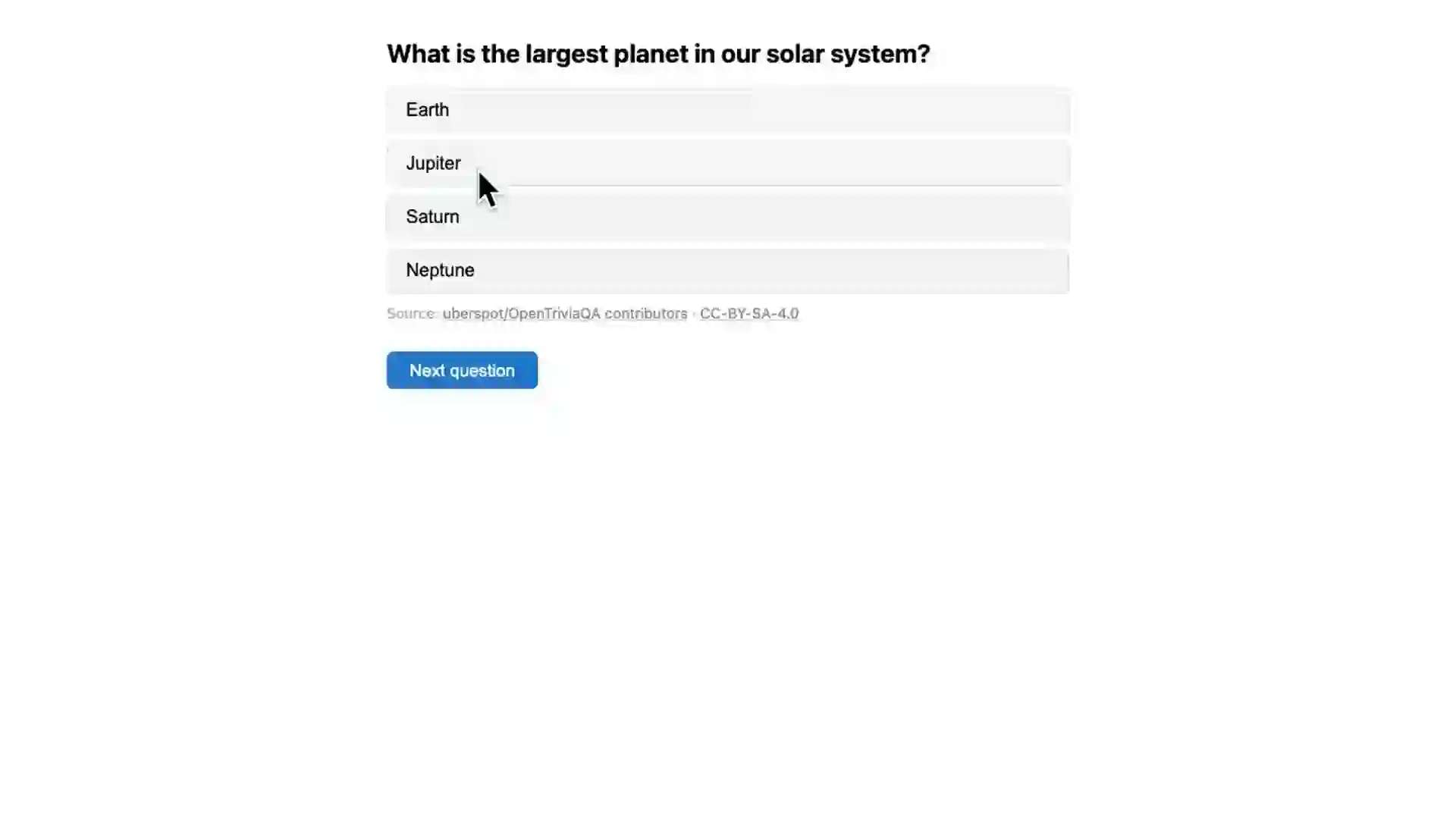
A working quiz app: pick a category, fetch a question, render the prompt and four answer choices as buttons. Click a button — instant feedback ("Correct" or "Wrong, the answer was X"). Click "Next question" — fresh question, no page reload. Multilingual switch ready to add in five lines.
Tech: one component (`App.tsx`), no router, no state library, no backend. The QuizBase API key lives in `.env.local`. The fetch lives in `useEffect`. The UI is whatever Tailwind / plain CSS you prefer — for this tutorial we keep it boring and unstyled so the data flow is the focus.
When you finish, you have a deployable static site. `pnpm build` produces a `dist/` folder. Drag it onto Vercel, Netlify, or Cloudflare Pages. Total cost to ship: zero dollars, zero servers, zero database migrations.
The stack — opinionated and boring
We choose **Vite + React + TypeScript**. Not because it is the fanciest stack, but because it is the stack every AI assistant on the planet has memorized. Cursor, Claude Code, GitHub Copilot — all of them produce working code with zero hand-holding for this combination. If you prefer Next.js, vanilla JS, or React Native, there are variants further down — the data layer is identical.
We deliberately skip a state library. `useState` and `useEffect` are enough. We deliberately skip a routing library. One page is enough. We deliberately skip a UI framework. Four `<button>` elements with two CSS rules look fine for a weekend prototype, and adding Tailwind is one `pnpm dlx tailwindcss init` away when you want it. Vibe coding rule of thumb: fewer dependencies, fewer LLM hallucinations about which API your dep exposes.
- Vite — instant dev server, zero config, build for production with
pnpm build. - React 19 —
useStateanduseEffectare all you need; nouseReducer, no Redux, no Zustand. - TypeScript — pays for itself the first time an LLM hallucinates a field name; the compiler catches it.
- QuizBase API — REST endpoint, single header for auth (
X-API-Key), response shape stable since v1. - No backend — Publishable keys (
qb_pk_…) are CORS-safe and can live in your client bundle. Secret keys (qb_sk_…) are server-only.
Build it step-by-step
Six steps, ten minutes. Each step is a paragraph of reasoning followed by code you can paste. No code is hidden, no dependency is unexplained, no step says "and then magic happens". If you get stuck, jump to the pitfalls section below.
Step 1
Create the Vite + React + TypeScript appSpin up a fresh project. The `react-ts` template gives you React 19, TypeScript strict mode, and Vite preconfigured. You will be in dev mode in fewer keystrokes than it takes to read this paragraph.
pnpm create vite@latest quiz-app -- --template react-ts
cd quiz-app
pnpm install
Step 2
Get your free QuizBase API keySign up at quizbase.runriva.com/pricing — pick the free tier (no card, 500 requests per day, every endpoint unlocked). After signup, your dashboard has a 'Create key' button. Pick a **publishable key** (prefix `qb_pk_…`, dashboard scope label `publishable`) — publishable keys are CORS-safe and meant for browser code. Copy it once (it is shown in plaintext exactly once for security reasons), then drop it into a new `.env.local` file at the root of your Vite app.
.env.local (gitignored by default in Vite) VITE_QUIZBASE_KEY=qb_pk_your_key_hereStep 3
Fetch your first questionOpen `src/App.tsx` and replace its contents with a single `useEffect` that fires once on mount. We hit `/v1/questions` with three filters — category, language, limit — and the publishable key in the `X-API-Key` header. Response is JSON; `data[0]` is your question with `text`, `correctAnswer`, and `incorrectAnswers` as separate fields.
src/App.tsx — minimal fetch import { useEffect, useState } from 'react'; interface Question { id: string; text: string; correctAnswer: string; incorrectAnswers: string[]; } export default function App() { const [question, setQuestion] = useState<Question | null>(null); useEffect(() => { fetch( 'https://quizbase.runriva.com/api/v1/questions' + '?category=science-and-nature&lang=en&limit=1', { headers: { 'X-API-Key': import.meta.env.VITE_QUIZBASE_KEY } } ) .then((r) => r.json()) .then((d) => setQuestion(d.data[0])); }, []); if (!question) return <p>Loading…</p>; return <h1>{question.text}</h1>; }Step 4
Render the four answer choicesThe API returns `correctAnswer` and `incorrectAnswers` separately so you can decide whether to shuffle. For a quiz we want them mixed — otherwise the correct answer is always last and the game is solved. A `useMemo` keyed on `question.id` shuffles once per question and remembers the order through re-renders.
Add inside the component import { useEffect, useMemo, useState } from 'react'; // … const choices = useMemo(() => { if (!question) return []; return [question.correctAnswer, ...question.incorrectAnswers] .map((value) => ({ value, sort: Math.random() })) .sort((a, b) => a.sort - b.sort) .map(({ value }) => value); }, [question?.id]); // JSX return ( <main style={{ maxWidth: 600, margin: '2rem auto', fontFamily: 'system-ui' }}> <h1>{question.text}</h1> <ul style={{ listStyle: 'none', padding: 0 }}> {choices.map((c) => ( <li key={c} style={{ margin: '0.5rem 0' }}> <button style={{ padding: '0.5rem 1rem', width: '100%' }}>{c}</button> </li> ))} </ul> </main> );Step 5
Handle answers — correct or wrongTrack which choice the user clicked. Compare to `question.correctAnswer`. Show a banner. Disable the buttons after answering — nobody wants to second-guess once they have committed. This is the smallest amount of state that makes the app feel like a real quiz.
Replace the JSX return const [selected, setSelected] = useState<string | null>(null); const isCorrect = selected === question.correctAnswer; return ( <main style={{ maxWidth: 600, margin: '2rem auto', fontFamily: 'system-ui' }}> <h1>{question.text}</h1> <ul style={{ listStyle: 'none', padding: 0 }}> {choices.map((c) => ( <li key={c} style={{ margin: '0.5rem 0' }}> <button disabled={selected !== null} onClick={() => setSelected(c)} style={{ padding: '0.5rem 1rem', width: '100%', background: selected === c ? (isCorrect ? '#c8f7c5' : '#f7c5c5') : undefined }} > {c} </button> </li> ))} </ul> {selected && ( <p> {isCorrect ? '✓ Correct!' : `✗ Wrong — the answer was ${question.correctAnswer}.`} </p> )} </main> );Step 6
Add a Next button and ship to productionWrap the fetch in a function, call it on mount and on 'Next question' click, reset the `selected` state when a new question arrives. Then build (`pnpm build`) and drag the `dist/` folder onto Vercel, Netlify, or Cloudflare Pages. The whole app is static — no server, no environment beyond the build-time injected `VITE_QUIZBASE_KEY`.
Build for production pnpm build # dist/ is your deployable folder — drag it to vercel.com, netlify.com, or pages.cloudflare.com
The complete app — one file, copy-paste ready
If you skipped the walkthrough and just want the finished thing, here is the whole `src/App.tsx`. Drop it in, add `VITE_QUIZBASE_KEY` to `.env.local`, run `pnpm dev`.
import { useEffect, useMemo, useState } from 'react';

interface Question {
  id: string;
  text: string;
  correctAnswer: string;
  incorrectAnswers: string[];
}

const API = 'https://quizbase.runriva.com/api/v1/questions';
const KEY = import.meta.env.VITE_QUIZBASE_KEY;

async function fetchQuestion(): Promise<Question> {
  const r = await fetch(`${API}?category=science-and-nature&lang=en&limit=1`, {
    headers: { 'X-API-Key': KEY }
  });
  const d = await r.json();
  return d.data[0];
}

export default function App() {
  const [question, setQuestion] = useState<Question | null>(null);
  const [selected, setSelected] = useState<string | null>(null);

  useEffect(() => {
    void fetchQuestion().then(setQuestion);
  }, []);

  const choices = useMemo(() => {
    if (!question) return [];
    return [question.correctAnswer, ...question.incorrectAnswers]
      .map((value) => ({ value, sort: Math.random() }))
      .sort((a, b) => a.sort - b.sort)
      .map(({ value }) => value);
  }, [question?.id]);

  if (!question) return <p>Loading…</p>;
  const isCorrect = selected === question.correctAnswer;

  return (
    <main style={{ maxWidth: 600, margin: '2rem auto', fontFamily: 'system-ui' }}>
      <h1>{question.text}</h1>
      <ul style={{ listStyle: 'none', padding: 0 }}>
        {choices.map((c) => (
          <li key={c} style={{ margin: '0.5rem 0' }}>
            <button
              disabled={selected !== null}
              onClick={() => setSelected(c)}
              style={{
                padding: '0.5rem 1rem',
                width: '100%',
                background:
                  selected === c ? (isCorrect ? '#c8f7c5' : '#f7c5c5') : undefined
              }}
            >
              {c}
            </button>
          </li>
        ))}
      </ul>
      {selected && (
        <p>
          {isCorrect
            ? '✓ Correct!'
            : `✗ Wrong — the answer was ${question.correctAnswer}.`}
        </p>
      )}
      <button
        onClick={() => {
          setSelected(null);
          void fetchQuestion().then(setQuestion);
        }}
        style={{ marginTop: '1rem', padding: '0.5rem 1rem' }}
      >
        Next question
      </button>
    </main>
  );
}
Get your free API key at /pricing — no credit card.
Let the AI write it — Cursor, Claude Code, Copilot
You are a vibe coder. Of course you want the AI to write this. Here are three prompts you can paste into Cursor, Claude Code, or GitHub Copilot — each produces a working app in under two minutes. The prompts include the exact API response shape, which is the difference between code that works on the first try and code that hallucinates `question.options` instead of `question.incorrectAnswers`.
Cursor
Cursor is the fastest path. The composer (Cmd+I on macOS, Ctrl+I on Windows/Linux) takes a single prompt and rewrites your project files in one shot. Open your fresh Vite app, hit the shortcut, paste the prompt below. In under two minutes you have a working quiz app — no scaffolding, no Stack Overflow tab.
How to use: Open the project root in Cursor → Cmd+I (Ctrl+I) → paste prompt → press Enter → review the proposed edit → Accept.
Build a trivia quiz app using the QuizBase API.

Stack: React + TypeScript + Vite. One component in src/App.tsx. No router, no state library, no styling framework — inline styles are fine.

API call:
  GET https://quizbase.runriva.com/api/v1/questions?category=science-and-nature&lang=en&limit=1
  Header: X-API-Key: <value from import.meta.env.VITE_QUIZBASE_KEY>

Response shape:
{
  "data": [{
    "id": "uuid",
    "text": "What is...?",
    "correctAnswer": "Answer",
    "incorrectAnswers": ["Wrong 1", "Wrong 2", "Wrong 3"]
  }]
}

Requirements:
1. Fetch one question on mount (useEffect).
2. Render the question and four answer choices as buttons (shuffle correct + incorrect with useMemo keyed on question.id).
3. Click a button → highlight it green if correct, red if wrong; show "Correct!" or "Wrong — the answer was X" below.
4. Disable all buttons after one is clicked.
5. Show a "Next question" button that fetches a new question and resets selection.
6. Loading state ("Loading…") before the first question arrives.

Use TypeScript types for the Question shape. No external deps beyond React.
Claude Code
Claude Code runs in your terminal and edits files directly. If you live in a terminal split (one pane vim/emacs/neovim, one pane Claude), this is the move. Same prompt, different invocation — Claude proposes file edits one at a time and waits for your accept/reject on each.
How to use: From the project root: `claude` then paste the prompt. Claude will read the existing App.tsx, propose the rewrite, and ask 'Accept this edit?'. Say yes.
Build a trivia quiz app using the QuizBase API.

Stack: React + TypeScript + Vite. One component in src/App.tsx. No router, no state library, no styling framework — inline styles are fine.

API call:
  GET https://quizbase.runriva.com/api/v1/questions?category=science-and-nature&lang=en&limit=1
  Header: X-API-Key: <value from import.meta.env.VITE_QUIZBASE_KEY>

Response shape:
{
  "data": [{
    "id": "uuid",
    "text": "What is...?",
    "correctAnswer": "Answer",
    "incorrectAnswers": ["Wrong 1", "Wrong 2", "Wrong 3"]
  }]
}

Requirements:
1. Fetch one question on mount (useEffect).
2. Render the question and four answer choices as buttons (shuffle correct + incorrect with useMemo keyed on question.id).
3. Click a button → highlight it green if correct, red if wrong; show "Correct!" or "Wrong — the answer was X" below.
4. Disable all buttons after one is clicked.
5. Show a "Next question" button that fetches a new question and resets selection.
6. Loading state ("Loading…") before the first question arrives.

Use TypeScript types for the Question shape. No external deps beyond React.
GitHub Copilot
Copilot is comment-driven. You write the spec as a top-of-file comment block, leave a TypeScript scaffold, and press Tab on the empty function body. Copilot fills in. Best when you want to learn by reading what an LLM writes line-by-line — it suggests one statement at a time, so you see each decision.
How to use: Paste the comment block + scaffold below into a fresh `src/App.tsx`, place your cursor inside the empty function body, and press Tab. Accept each suggestion with Tab, dismiss with Esc.
// Trivia quiz app powered by the QuizBase API
// API: GET https://quizbase.runriva.com/api/v1/questions?category=science-and-nature&lang=en&limit=1
// Auth: X-API-Key header from import.meta.env.VITE_QUIZBASE_KEY
// Response shape: { data: [{ id, text, correctAnswer, incorrectAnswers: string[] }] }
//
// Requirements:
// - Fetch question on mount with useEffect
// - Shuffle correctAnswer + incorrectAnswers into four buttons (useMemo keyed on question.id)
// - On click: highlight correct=green / wrong=red, disable buttons, show feedback text
// - "Next question" button refetches and resets selection
// - Loading state before first question
import { useEffect, useMemo, useState } from 'react';

interface Question {
  id: string;
  text: string;
  correctAnswer: string;
  incorrectAnswers: string[];
}

export default function App() {
  // Press Tab and let Copilot write the rest
}
Skip the code entirely — connect via MCP
You can also skip the REST API and let your AI assistant talk to QuizBase directly via the Model Context Protocol. The MCP server at `https://quizbase.runriva.com/mcp` exposes 12 typed tools — your AI sees them as native capabilities, with full schema and response shape upfront. No fetch boilerplate, no field-name hallucinations, no client SDK to keep in sync.
- Zero code to write — your AI assistant gets
quizbase_random,quizbase_list,quizbase_question_by_idand 9 more tools as native capabilities. - No more "but the LLM hallucinated my field names" — the MCP server tells the AI the exact tool schema, parameters, and response shape upfront.
- Same key, same free tier — your
qb_pk_…works for MCP and REST identically. One quota, one place to rotate. - Works alongside REST — connect MCP for ideation and prototyping in Cursor, ship the actual app with REST when you are ready for production.
Cursor
Cursor reads `.cursor/mcp.json` (per-project) or `~/.cursor/mcp.json` (global). Drop the snippet below, restart Cursor, and `quizbase_*` tools appear in the composer. Now you can prompt "give me five random history questions in Polish" and Cursor calls the tool directly — no fetch, no API key handling, no shape guessing.
{
  "mcpServers": {
    "quizbase": {
      "url": "https://quizbase.runriva.com/mcp",
      "headers": {
        "Authorization": "Bearer qb_pk_your_key_here"
      }
    }
  }
}
Try it: In Cursor composer: "Using the quizbase MCP server, generate a daily history quiz for my React app — five medium-difficulty questions in Polish, render them as a static page." Cursor calls `quizbase_random` with those filters and writes the React page in one shot.
Claude Code (CLI)
Claude Code uses the `claude mcp` subcommand. One line and you have 12 new tools your terminal-resident AI can call.
claude mcp add quizbase \
  --transport http \
  --url https://quizbase.runriva.com/mcp \
  --header "Authorization: Bearer qb_pk_your_key_here"

# verify
claude mcp list
Try it: In Claude Code: "Build a trivia game backed by quizbase — 10 rounds, mixed categories, with a timer." Claude calls `quizbase_categories` first to see what is available, then `quizbase_random` ten times with different filters, and writes the whole app file by file.
Claude.ai / Claude Desktop (Custom Connectors)
Claude.ai web and Claude Desktop support Custom Connectors — HTTP MCP servers configured through the UI, no JSON file. Best when you are exploring ideas in conversational chat before committing to code.
Name:    QuizBase
URL:     https://quizbase.runriva.com/mcp
Auth:    Bearer token
Token:   qb_pk_your_key_here
Try it: In a regular Claude.ai chat: "Brainstorm five quiz app ideas using QuizBase, then for the most promising one give me a Vite + React starter I can paste into a fresh project." Claude calls `quizbase_categories` and `quizbase_languages` to understand the dataset, then designs the app and produces code.
Want to test before configuring anything? /playground/mcp is our interactive MCP tester — paste your key, see all 12 tools, run them with form inputs, copy the JSON.
Or: ask your AI what to build
Honestly? Your AI probably has better ideas than us. We have a single-file documentation bundle at `https://quizbase.runriva.com/llms-full.txt` — every endpoint, every parameter, every response field, formatted for LLM consumption (one fetch, no scraping). Paste the prompt below into Cursor, Claude Code, or even ChatGPT. It will read our docs, brainstorm, and you can build something we never thought of.
I want to build something with the QuizBase API.

Their full developer documentation as a single document is at:
  https://quizbase.runriva.com/llms-full.txt

(That URL is designed to be fetched as plain text — every endpoint, every parameter, every response field. You can read it with one fetch.)

Their MCP server is at https://quizbase.runriva.com/mcp — if you have MCP support, you can call `quizbase_random`, `quizbase_list`, `quizbase_question_by_id`, `quizbase_categories`, `quizbase_topics`, `quizbase_topic_by_slug`, `quizbase_tags`, `quizbase_subcategories`, `quizbase_languages`, `quizbase_stats`, and `quizbase_report` directly.

Read the docs, look at what is possible, and brainstorm with me. Specifically:

1. What are five interesting things I could build that go beyond a basic single-question quiz?
2. For each idea, what API endpoints / MCP tools would I use, and roughly how much code would it take?
3. Which idea is the best fit for a weekend project — small enough to ship but interesting enough that someone would actually use it?
4. Pick that one and let's start building. Ask me anything you need to know.
This is how we want this to work. The docs are open, the dataset is open, the MCP server is open. We do not know what people will build with QuizBase. That is the point. If you ship something cool, tell us — `/about` page has the contact details. We will showcase it.
See it ship
Other stacks — same API, same idea
Vite + React is the easiest starting point but it is not the only one. The QuizBase API call is identical across runtimes — only the rendering layer changes. Here are three more variants you can copy.
Next.js (App Router + Server Component)
When to use: You want server-side rendering, a hidden API key (use `qb_sk_…` server-only), SEO friendly HTML, or you already have a Next.js project. The QuizBase key never reaches the client bundle.
// app/page.tsx
import { revalidatePath } from 'next/cache';

async function fetchQuestion() {
  const r = await fetch(
    'https://quizbase.runriva.com/api/v1/questions?category=science-and-nature&lang=en&limit=1',
    {
      headers: { 'X-API-Key': process.env.QUIZBASE_SECRET_KEY! },
      cache: 'no-store' // fresh question every request
    }
  );
  return (await r.json()).data[0];
}

export default async function Page() {
  const q = await fetchQuestion();
  return (
    <main>
      <h1>{q.text}</h1>
      <ul>
        {[q.correctAnswer, ...q.incorrectAnswers].map((c) => (
          <li key={c}>{c}</li>
        ))}
      </ul>
      <form action={async () => { 'use server'; revalidatePath('/'); }}>
        <button type="submit">Next question</button>
      </form>
    </main>
  );
}
Vanilla JS (single HTML file, no build step)
When to use: You want a one-file prototype, an embed for a static site, or to teach a beginner the API without explaining 'what is npm'. Open the file in a browser — works.
<!doctype html>
<html lang="en">
<body>
  <main id="app">Loading…</main>
  <script>
    const KEY = 'qb_pk_your_key_here'; // publishable key — CORS-safe in browser
    async function load() {
      const r = await fetch(
        'https://quizbase.runriva.com/api/v1/questions?lang=en&limit=1',
        { headers: { 'X-API-Key': KEY } }
      );
      const q = (await r.json()).data[0];
      const choices = [q.correctAnswer, ...q.incorrectAnswers]
        .sort(() => Math.random() - 0.5);
      document.getElementById('app').innerHTML = `
        <h1>${q.text}</h1>
        ${choices.map((c) => `<button data-c="${c}">${c}</button>`).join('')}
        <p id="feedback"></p>
        <button id="next">Next</button>
      `;
      document.querySelectorAll('[data-c]').forEach((b) => {
        b.onclick = () => {
          const correct = b.dataset.c === q.correctAnswer;
          document.getElementById('feedback').textContent = correct
            ? '✓ Correct!' : '✗ Wrong — answer was ' + q.correctAnswer;
        };
      });
      document.getElementById('next').onclick = load;
    }
    load();
  </script>
</body>
</html>
React Native (Expo)
When to use: You are shipping a mobile quiz game. Expo lets you ship to iOS, Android, and web from one codebase. Same QuizBase API call, same key handling — just `View` and `Text` instead of `div` and `p`.
import { useEffect, useState } from 'react';
import { Button, FlatList, Text, View } from 'react-native';

export default function App() {
  const [q, setQ] = useState<any>(null);

  useEffect(() => {
    fetch(
      'https://quizbase.runriva.com/api/v1/questions?category=science-and-nature&lang=en&limit=1',
      { headers: { 'X-API-Key': process.env.EXPO_PUBLIC_QUIZBASE_KEY! } }
    )
      .then((r) => r.json())
      .then((d) => setQ(d.data[0]));
  }, []);

  if (!q) return <Text>Loading…</Text>;
  const choices = [q.correctAnswer, ...q.incorrectAnswers]
    .sort(() => Math.random() - 0.5);

  return (
    <View style={{ padding: 24, marginTop: 48 }}>
      <Text style={{ fontSize: 20, marginBottom: 16 }}>{q.text}</Text>
      <FlatList
        data={choices}
        keyExtractor={(c) => c}
        renderItem={({ item }) => (
          <Button
            title={item}
            onPress={() =>
              alert(item === q.correctAnswer ? 'Correct!' : 'Wrong')
            }
          />
        )}
      />
    </View>
  );
}
Pitfalls — things that will trip you up
Six gotchas we see in real support requests, with the actual fix. If you hit one, this section saves you fifteen minutes of Googling.
CORS errors when I deploy to production.
You are probably using a secret key (
qb_sk_…) in the browser — those are deliberately not CORS-safe. Publishable keys (qb_pk_…) work from any origin and are designed for client-side code. Swap the key in your env var, redeploy."No questions matched" — empty `data` array.
Your filter combination is too narrow. Common offender: a small category combined with a small language. Drop one filter (try
?lang=enonly) to verify, then add filters back one at a time. The/v1/questions/randomendpoint never returns empty for valid filters.Rate limit hit (HTTP 429) during development.
Free tier is 500 requests per day per account. If you are hot-reloading on every keystroke,
useEffectmay be firing fifty times per minute. Cache the question in state (you already do), and use?limit=10plus a client-side pointer instead of one fetch per question. The 429 response includes aRetry-Afterheader — honor it.I accidentally committed my API key to git.
Rotate it immediately in the dashboard (the old key is revoked and a new one issued). Then:
.env*should be in.gitignore(Vite adds this automatically; double-check). For team projects, use.env.examplewith placeholder values committed instead of real ones.TypeScript complains about `import.meta.env.VITE_QUIZBASE_KEY` being `string | undefined`.
It is — Vite cannot prove the env var exists at build time. Either non-null-assert (
!) if you have a build-time check, or add asrc/vite-env.d.tswithinterface ImportMetaEnv { readonly VITE_QUIZBASE_KEY: string }. The official TypeScript SDK (@quizbase/client, npm) ships with the response shape typed so you do not need to defineQuestionmanually.My Cursor / Claude Code prompt produced code that does not compile.
Usually the AI invented a field name (e.g.
question.choicesorquestion.optionsinstead of the realquestion.correctAnswer+question.incorrectAnswers, ordata.questioninstead ofdata[0]). Paste the response shape from the prompt block above into the same chat and ask it to fix. Or paste the failing error message — both Cursor and Claude Code are good at self-correction when you give them the compiler output.
Frequently asked questions
- Do I really need zero backend?
- Yes for development and weekend projects — publishable keys (`qb_pk_…`, dashboard scope label `publishable`) are CORS-safe by design and meant to live in client-side code. For production you have a choice: keep using publishable keys client-side (simple, rate-limited per account, anyone can read them from DevTools but they cannot do more than your tier allows) or switch to secret keys (`qb_sk_…`) behind a tiny serverless proxy if you want to hide your usage patterns from prying eyes. Either is fully supported.
- Is the free tier really free, with no credit card?
- Yes. 500 requests per day, forever, no card on file, no trial countdown. The free tier exists because we want you to try the API end-to-end before paying. When you ship to production and need higher limits, paid tiers start at a price designed for solo developers — see the pricing page for exact numbers.
- Can I deploy this to Vercel, Netlify, or Cloudflare Pages?
- Yes. Run `pnpm build` and drag the resulting `dist/` folder onto any of the three. The QuizBase key is injected at build time (`VITE_QUIZBASE_KEY`), so you set it in the host dashboard as a build-time environment variable — the rest is static HTML, CSS, and JavaScript.
- How many languages are supported?
- English and Polish today, more on request. You can list what is live with `GET /v1/languages` — the response is a JSON array of language codes plus a count of quiz-ready questions per code. To switch your app's language, change the `?lang=` parameter (`en`, `pl`).
- How accurate are the questions?
- Each question carries a full `attribution` object — `source` (which upstream dataset: OpenTDB, OpenTriviaQA, MKQA), `author`, `license`, and `modifications`. We curate, deduplicate, and translate; we do not generate questions with an LLM. If you spot a wrong answer, every question has a /report endpoint and a `Report` link on the dashboard.
- Why not just use ChatGPT or Claude to generate questions?
- Three problems. (1) LLMs hallucinate — answers that look right but are wrong, especially on dates, biology, and edge-case trivia. (2) Difficulty is inconsistent — the same prompt produces wildly different challenges across runs. (3) No attribution chain — you cannot tell users where a fact came from. QuizBase questions trace back to a real source dataset with a known license.
- Can I filter by tags, subcategories, or topics?
- Yes. Beyond the 24 top-level categories, every question has tags (proper nouns: `python`, `napoleon`, `dna`) and subcategories (broader groupings: `european-capitals`, `cellular-biology`). Filter with `?tags=python`, `?subcategory=european-capitals`, or `?topics_any=programming,linguistics` to get questions from any of multiple topics.
- Can my AI agent (Claude Desktop, Cursor, ChatGPT) use QuizBase?
- Yes — and as a vibe coder you might want to skip the REST API entirely and use MCP instead. We ship a Model Context Protocol server at `https://quizbase.runriva.com/mcp` (Streamable HTTP). Add it to Cursor, Claude Code, or Claude Desktop and your AI gets 12 trivia tools (`quizbase_random`, `quizbase_list`, `quizbase_question_by_id`, `quizbase_topics` and 8 more) as native capabilities — no fetch, no API shape guessing, no client SDK. See the MCP section above for one-snippet setup per client. There is also `/.well-known/mcp` for auto-discovery and `/openapi.json` for ChatGPT Custom GPT actions.
- Is commercial use allowed?
- Yes. The API is commercially licensed per your subscription tier — that is what your /pricing plan covers (rate limits, freshness, support, MCP, SDK, curated topics). The underlying source records carry their original open licenses (most are CC-BY-SA-4.0, some CC-BY-4.0 / MIT); the BY-SA dump at /data is the share-alike publication that the upstream license obliges us to make available. Each API response includes a per-row `attribution` object (license, author, source, modifications) so you can comply with upstream attribution requirements without reading a single page of legal text. Note: BY-SA share-alike applies if you redistribute the raw question records — your own UI, scoring logic, and product on top of the API are yours.
- Where do I get help if something breaks?
- Docs at quizbase.runriva.com/docs, including a quickstart, full API reference, SDK guides, and troubleshooting. For API or platform bugs, use the in-dashboard "Report a problem" button — it auto-attaches your request_id, endpoint, and Sentry breadcrumbs, so triage is fast. The same button is on every error page. Not logged in? "Report a bug" link in the page footer opens an email draft. SDK-specific bugs go to github.com/maciejdzierzek/quizbase-sdk-ts. Content bugs in a question (wrong answer, bad translation) use POST /api/v1/report or the quizbase_report MCP tool. Status page at /status if you suspect an outage. Average response time is under 48 hours during the week.
Ten things to build next — pick one, ship it this weekend
You have the basic quiz. Here are ten directions you could take it — each small enough to ship in a weekend, each different enough that the resulting app is its own thing. Half of them, your AI can scaffold for you in fifteen minutes if you paste this idea into Cursor and ask.
1. Daily challenge mode
Show every visitor the same five questions today, a different five tomorrow. Use the date as a seed — same date, same questions for everyone, perfect for a 'compete with friends' angle. Two-line change: derive a deterministic seed from the date and pass it to `?seed=` (or use `quizbase_random` with a fixed cursor).
2. Time pressure mode Article →
Add a five-second timer per question. Auto-submit on timeout. Score the streak — three wrong in a row resets your run. The mechanic that makes trivia apps actually addictive instead of "play once and forget".
3. Language gauntlet
Ask the user to pick three languages. Round one in English, round two in their first pick, round three in their second pick, round four in the third. Same question difficulty across languages — proves your app handles real i18n, not just "we support locales".
4. Topic deep-dive
Let the user type a topic (e.g. "biology", "napoleon", "python"). Use `?tags=` or `?topics_any=` to filter the question pool. Now it is not "general trivia" — it is "biology trivia for med students" or "napoleon trivia for the history nerd in your life".
5. Slack / Discord bot Article →
Two-question-per-day bot for a community channel. Post the question at 10am, reveal the answer at 6pm, track who answered first. Twenty lines of Node + the Slack/Discord SDK + QuizBase API.
6. Quiz lead-gen widget Article →
Embed a five-question quiz on your SaaS landing page. After answering, ask for email to "see how you compare". Industry: 5-10× higher conversion than "subscribe to our newsletter" CTAs. Build it as a `<script>` snippet others can drop into their own site.
7. Anki flashcards generator Article →
Fetch 50 questions in a category, export as Anki .apkg (or CSV for Quizlet). One button, one download.
8. Multiplayer real-time Article →
Two players, same question shown to both, first to click correct wins the round. Use a tiny WebSocket server (or Pusher / Ably / Liveblocks free tier) to sync. The complexity is the realtime layer, not the trivia — that part you already have.
9. Daily email digest
Five trivia questions in an email, every morning, on a topic the subscriber picked. Resend or Postmark free tier handles delivery. Reading time: 90 seconds. Retention metric people actually open.
10. Voice quiz (Alexa / mobile)
Wrap the API in a voice skill. "Hey Alexa, ask QuizBase for a science question." Response via speech synthesis. Doable in an afternoon if you have ever shipped an Alexa skill before — the trivia content is the easy part.
11. Cursor extension: code + trivia pomodoro Article →
Ship a Cursor (or VS Code) side-panel extension that enforces the pomodoro break with a fresh trivia question. 25-minute focus, then one QuizBase question on the answer panel. Streak tracking persisted in extension state — survives editor restarts. About 150 lines of TypeScript.
Ready to ship?
Free tier, no credit card. Indie ($9/mo) or Pro ($29/mo) when you ship to real users.
What to build next
You have a working quiz app. Here is where to go from here — each link is a concrete next step, not a vague "explore our docs".
- Add a multi-round game with score tracking →
Turn the single-question demo into a 10-round game with a running score. Step-by-step guide.
- Switch the question language at runtime →
Add a language dropdown — English and Polish are live, with `?lang=` ready to expose more from the dataset based on demand. One extra fetch, one extra state.
- Connect a Claude or Cursor agent via MCP →
Skip the REST layer entirely. Your AI assistant gets `quizbase_random` and `quizbase_list` as native tools.
- Browse the full API reference →
Every filter, every parameter, every response field — with examples.
- Install the TypeScript SDK for first-class types →
Skip the manual `interface Question`. Get autocomplete on every field, every response, every error code.